
DAILY NEWS

Stay Ahead, Stay Informed – Every Day

Advertisement
I audited 25 of my open-source repos. Stars lied.


A friend asked me yesterday how the open-source side of the studio is doing. I checked GitHub. The top repo had five stars. Most had zero. I almost wrote back “yeah, slow start, nothing to see yet.”

Then I actually ran the numbers. 3,681 npm installs last month across 15 packages. 254 PyPI installs on a six-day-old library. 12 forks. 30 to 40 unique visitors per week on the top five repos. Real users opening real issues are zero, which means either nothing is broken or nobody is loud yet, and the install counts say it is the second one.

So I sat down and audited all 25 public repos in one session. Here is what I found, what I fixed, and why GitHub stars are basically the wrong number to look at when you are five weeks into shipping.

The setup

Five weeks ago I started pushing the StudioMeyer MCP work to public repos. Memory, CRM, GEO, Crew, and a growing pile of foundation pillars under the MCP Factory umbrella. Test harnesses for the Model Context Protocol spec, security middleware in TypeScript and Python, a Rust sidecar against marketplace poisoning, n8n templates, a few tooling repos. Twenty five public repos in the studiomeyer-io org by the time I ran today’s audit. Mostly TypeScript, one Rust crate, one Python package, two n8n template collections.

The audit question was plain: are people actually using this stuff?

Method

I pulled four data sources in parallel and joined them per repo:

GitHub API for stars, forks, watchers, open issues, open pull requests, last push, license, archived state.

npm registry + npm-stat for last-week and last-month download counts and current published version, per package.

crates.io API for the one Rust crate, with the recent 90-day download count and per-version splits.

PyPI + pypistats for the one Python package, with the last-month and last-day numbers.

Then for each repo I checked the last three GitHub Actions runs, listed the open Dependabot security alerts, looked at the GitHub Traffic counts (views and clones, last 14 days), and pulled all open and closed issues plus PRs.

The whole thing took about thirty minutes. I am keeping the recipe in my memory system so I can run it again every quarter without thinking.

What stars said vs. what downloads said

Top of the list by stars:

Repo
Stars
Forks

local-memory-mcp
5
3

ai-shield
2
2

darwin-agents
2
0

studiomeyer-memory
2
2

n8n-templates
2
1

n8n-nodes-studiomeyer-memory
2
1

mcp-video
1
0

studiomeyer-crm, geo, crew
1, 1, 1
1, 1, 0

If you stop here you would conclude the work has not landed. Average just over one star per repo. Several flagship MCP packages with zero stars and zero forks.

Top of the same list by npm downloads in the last 30 days:

Package
Last week
Last month

mcp-academy
18
535

n8n-nodes-studiomeyer-memory
186
491

mcp-personal-suite
11
368

mcp-tenant-pair
181
331

mcp-hook-conformance
152
285

mcp-tenant-pair-demo
160
281

mcp-tenant-pair-cli
141
268

mcp-attest-demo
11
260

mcp-protocol-conformance
11
232

mcp-server-attestation
13
148

mcp-studiomeyer-agents
144
144

mcp-attest-cli
12
123

mcp-spec-migrator
103
103

mcp-stdio-shellguard
101
101

mcp-video
2
11

That is 3,681 installs across 15 packages in 30 days, on top of 254 PyPI installs on the Python port of ai-shield (six days old at audit time), and 25 cargo installs on the Rust mcp-armor crate (also six days old).

The packages I shipped most recently, mcp-studiomeyer-agents and mcp-stdio-shellguard, picked up around 100 to 150 installs in the first week without any Reddit post, no HN submission, no email blast. They went out, registered on the MCP Registry index, got picked up by npm search, and people just installed them.

Stars and downloads are not the same metric. Stars need someone to log in, click, and get nothing back. Downloads need someone to read about a tool and run npm install. The second one is much closer to actual usage.

Issues, PRs, traffic

Closed issues across all 25 repos: four. ai-shield had two, mcp-video had one, local-memory-mcp had one. Open issues: zero, except for one cosmetic ticket on mcp-academy from a while ago. That tells me either the libraries are stable enough that nothing is breaking for users, or nobody is loud about bugs yet. Probably both, weighted toward the first because the test suites are large and the dependency surface is small for most of these packages.

Pull requests over the period: 31 merged. Most are Dependabot. A few are real fixes. ai-shield got two real PRs, mcp-personal-suite got nine. The Dependabot stream is doing actual work in the background, keeping lockfiles current.

GitHub Traffic for the last 14 days, just unique visitors so the numbers are honest:

Repo
Unique views (14d)

ai-shield
37

darwin-agents
38

studiomeyer-geo
39

n8n-templates
30

studiomeyer-memory
23

agent-fleet
22

studiomeyer-marketplace
20

Thirty unique visitors on a repo over two weeks is not viral, but it is not dead either. Multiply by the number of repos and the org page is getting real attention.

Then the actual fixing

The audit surfaced one repo with real work and a few cosmetic issues.

mcp-academy had seven open Dependabot security alerts. Two high severity around fast-uri, four medium around hono CSS injection and cache leakage and bodyLimit bypass, one low around hono JWT validation. I checked the lockfile via the GitHub contents API and decoded the base64. Both transitive dependencies were already on the patched version. The Dependabot scan had not propagated yet. I dismissed all eight alerts (one was for ip-address, also already patched) with reason fix_started and a comment showing the lockfile state. There was also one open Dependabot PR bumping fast-uri from 3.1.0 to 3.1.2. I merged it. Master HEAD is now 74bf554 with zero open alerts.

mcp-personal-suite had a failing CI step on npm audit –audit-level=high. Same root cause as academy: transitive vulnerable dependencies. The package.json had no overrides for hono or fast-uri, so the lockfile was stuck on hono 4.12.14 and fast-uri 3.1.0. I cloned it locally, added overrides: { “hono”: “>=4.12.18”, “fast-uri”: “>=3.1.2” } to package.json, ran npm install to regenerate the lockfile, then ran npm audit fix which also bumped axios 1.15.1 to 1.16.0, ip-address 10.1.0 to 10.2.0, express-rate-limit 8.3.2 to 8.5.1, and uuid 11.1.0 to 11.1.1. Result: zero vulnerabilities, all 419 tests pass, build clean. Pushed as e93ace4. CI went green within 90 seconds.

Five connector repos had recurring failed CI runs that were never real failures. The studiomeyer-memory, studiomeyer-crm, studiomeyer-geo, studiomeyer-crew, and studiomeyer-marketplace repos are docs-only mirrors. They have a README and a license file. No package.json, no .github/workflows/ directory. But Dependabot still tries to update GitHub Actions versions on a daily scan, and every attempt fails because there is nothing to update. The fix is one file per repo: .github/dependabot.yml with version: 2 and updates: (). That tells Dependabot explicitly that this repo has nothing for it to scan. Five commits, one per repo. The cached failed runs from before will stay in the history but no new ones will land.

One more repo, mcp-studiomeyer-agents, had the same docs-only Dependabot pattern but with a real package.json. It is a stdio MCP server published to npm but it has no CI workflow because the package itself is the deliverable. I scoped its dependabot.yml to npm only with no github_actions block.

Total time for all the fixing, in one session: about an hour, including the audit. Most of it was waiting for the npm install to finish on personal-suite.

What this taught me about KPIs early in OSS

The default narrative when stars are low is that the work is invisible. That is wrong. Stars are a visibility lag indicator. They show up after a Reddit post goes well, after a Hacker News Show HN climbs, after a Twitter thread gets quoted by someone bigger. They do not show up because someone installs your package and uses it for a week.

Five things actually move during the early weeks:

Downloads on the package registry, weekly and monthly. npm filters obvious bot mirrors out of public stats, so the numbers are closer to honest than they look.

Forks, because somebody who forks usually wants to actually run the code or change something.

GitHub Traffic uniques over 14-day windows. Bots do not consistently produce uniques across rolling windows.

Closed issues, closed PRs, the absolute number, because it tells you whether anybody who hit a real bug bothered to file something.

Dependabot health, because as your dependency tree grows, vulnerable packages will eat your CI if you do not stay on top of it.

If I had only been watching stars I would have written off the entire MCP Factory effort. mcp-protocol-conformance has zero stars and is on its way to clearing 250 monthly installs. mcp-stdio-shellguard hit 101 installs in its first six days with the same star count.

The stars will come. They come from a viral post, from a referenced position in a comparison article, from one influencer dropping a link. None of those things happen because the CI is green. They happen because the code does something useful and someone outside the org notices.

What I would tell my past self

Run the audit early. Run it monthly. Keep the recipe out of your head and in a script or a memory system that survives between sessions. The hour I spent today turned a vague “we should ship more stars” anxiety into a concrete list of one real bug fix and five repos that needed silencing. None of those would have been visible from the GitHub front page.

Also: GitHub does not give you that audit by default. You have to write it yourself. The good news is that the data is all there, in three free APIs, and parsing it takes about thirty lines of bash.

Next pieces of work, in priority order, are a Reddit r/mcp post for mcp-armor, since five weeks of zero stars on a real Rust security crate with 100+ npm-equivalent installs is a fair candidate for the “oh, that exists?” reaction. And a Hacker News Show HN for mcp-stdio-shellguard once the next CVE wave hits. Both are visibility moves, not engineering moves.

Engineering side of the org keeps shipping. The audit just made it less invisible to me.

If you want the recipe I used, the bash and the Python parsing, the gh API patterns, the npm-stat fallback, ping me. I will write it up as a separate post if more than three people ask. Otherwise the version in my notes is enough.


Source link

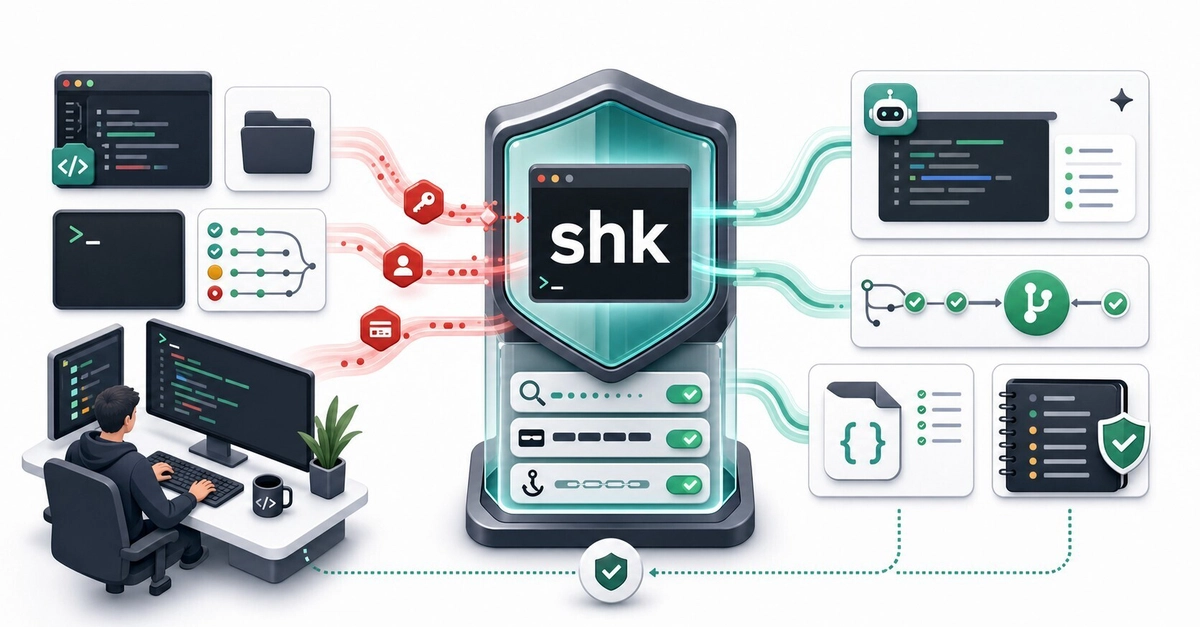
shk: A Local-First Security Guardrail CLI for AI Coding Agents


Secret scanning often starts at Git. AI coding agents can make that too late.

They can read local files, summarize logs, run commands, and transform sensitive context before anything is committed. shk is a local-first CLI for that messy pre-commit space: scan secrets and PII, mask prompts, and install managed hooks for Claude Code, Cursor, and Codex.

The problem is no longer just “secret reaches Git”

Most secret-scanning workflows are built around a familiar boundary: stop credentials before they land in Git, CI logs, or a release artifact.

AI coding agents move that boundary earlier.

An agent might read a file while following an import chain. It might summarize a pasted error log. It might run a shell command that prints .env contents. It might create a new file that quietly contains a token from earlier context. None of that requires a commit.

That is the gap shk is trying to cover: the local, messy, pre-commit space where AI tools actually operate.

What shk does in practice

shk is not one more dashboard you have to check. It is a single Rust binary that you put around the workflows where sensitive context tends to leak:

Before sharing context with an AI tool, use shk mask to redact secrets and PII from a prompt, log, or snippet.

Before an AI tool reads, writes, fetches, or runs something, use managed hooks to audit or block risky operations.

Before a commit or pull request, use the same scanner through Git pre-commit hooks and GitHub Actions.

That gives you one policy file, one set of rules, and one exit-code contract across local use, AI hooks, Git, and CI.

A quick tour

Install the latest release:

curl –proto ‘=https’ –tlsv1.2 -LsSf https://github.com/Kazuki-tam/security-harness-kit/releases/latest/download/shk-cli-installer.sh | sh

Enter fullscreen mode

Exit fullscreen mode

Windows users can install from PowerShell:

powershell -c “irm https://github.com/Kazuki-tam/security-harness-kit/releases/latest/download/shk-cli-installer.ps1 | iex”

Enter fullscreen mode

Exit fullscreen mode

Both shk and security-harness-kit resolve to the same CLI.

Start with a policy file:

shk init

Enter fullscreen mode

Exit fullscreen mode

Scan the current project:

shk scan .

Enter fullscreen mode

Exit fullscreen mode

Example output:

3 findings

HIGH secret.openai_api_key src/app.ts:12 Possible OpenAI API key detected
MED pii.ja.phone config/dev.ts:5 Japanese phone number detected
MED pii.en.ssn docs/test.md:8 US Social Security Number detected

Enter fullscreen mode

Exit fullscreen mode

Need a machine-readable report for automation? Use JSON. Raw matched values are not emitted; findings use redacted_value: “(REDACTED)”.

shk scan . –json

Enter fullscreen mode

Exit fullscreen mode

Need to paste a production log into an AI chat? Mask it first:

shk mask

Enter fullscreen mode

Exit fullscreen mode

Need to protect the commit path?

shk scan –staged
shk hooks install

Enter fullscreen mode

Exit fullscreen mode

The basic loop is intentionally boring: scan, review, mask, and block only when a configured threshold is met.

The AI-specific part: managed hooks

The more interesting piece is shk hooks install-ai.

Instead of relying on you to remember to scan every prompt, shk can write managed hook entries into supported AI tool configs:

# Preview the changes first.
shk hooks install-ai –dry-run

# Start in audit mode: log findings, never block.
shk hooks install-ai –audit

# Or target one tool.
shk hooks install-ai –tool cursor
shk hooks install-ai –tool claude-code –global

Enter fullscreen mode

Exit fullscreen mode

Project-level installs are the default. Global installs write to the user-level config for the selected tool.

Supported integrations:

Tool
Managed config

Claude Code
.claude/settings.json

Cursor
.cursor/hooks.json

Codex
.codex/config.toml

The managed entries are tagged so they are easy to identify later (“_shk_managed”: true in JSON configs, or # shk-managed-start / # shk-managed-end in shell and TOML blocks).

It checks intent, not only text

Secret scanners usually inspect content. AI hooks also need to inspect actions.

In hook mode, shk reads the AI tool’s JSON hook payload and runs an action guard before scanning extracted text. The guard looks for operation shapes such as:

Reads or writes involving sensitive paths.
Commands that dump .env-style files.
Destructive recursive removal.
Direct database mutation commands.
Privilege or system configuration changes.
External transfer commands.
Package-manager operations.

The default recommended profile is conservative. A strict profile can also block opaque execution forms such as bash -c, python -c, and node -e, because pretending to safely interpret every nested command string is usually worse than being explicit about the risk.

You can tune this in shk.toml with (action_guard) allow and deny patterns.

Audit first, then block

Hooks make decisions through exit codes, so the contract is small:

Code
Meaning

0
No finding at or above the active threshold, or audit/post-hook completed.

1
Scan findings met or exceeded the active threshold.

2
A blocking AI pre-hook fired, or shk scan –staged ran outside a Git repo.

–audit always exits 0. Post-tool hooks also always exit 0, because the operation already happened and the useful behavior is reporting, not pretending to undo it.

That makes rollout straightforward:

shk hooks install-ai –audit

Enter fullscreen mode

Exit fullscreen mode

Let it run for a few days. Review .shk/audit.log. The log is metadata-only: counts, tool name, hook phase, display path, suppressed count, and maximum severity. It does not store raw matched values.

Once the noise level is acceptable, reinstall without –audit and let high-severity pre-hook findings block.

Same binary for Git and CI

AI hooks are the new boundary, but Git still matters.

Install a managed pre-commit hook:

shk hooks install

Enter fullscreen mode

Exit fullscreen mode

Generate a GitHub Actions workflow:

shk ci init github

Enter fullscreen mode

Exit fullscreen mode

The generated workflow installs the prebuilt release binary and runs:

shk scan . –json –fail-on high

Enter fullscreen mode

Exit fullscreen mode

It also uses a few defaults I wanted out of the box:

permissions: contents: read for minimal GITHUB_TOKEN scope.

concurrency: cancel-in-progress: true so newer PR pushes cancel stale runs.

actions/checkout@v6.
Release installer instead of cargo install, so CI does not rebuild a Rust toolchain.

You can also generate rollout variants when you need them:

shk ci init github –mode audit for non-blocking CI adoption.

shk ci init github –shk-version v0.2.3 for reproducible pinned installs.

A few workflows beyond scanning

These are the commands that make shk feel less like a one-off scanner and more like a local security harness:

shk doctor checks project hygiene, including ignore coverage and plaintext .env files.

shk doctor ignore –fix appends missing required patterns to .gitignore.

shk env dotenvx import-keys .env.keys moves dotenvx private keys into the OS credential store.

shk env dotenvx run — npm test injects stored dotenvx keys only into the child process.

shk secrets push pushes dotenv payloads into AWS Secrets Manager or GCP Secret Manager through the official aws / gcloud CLIs, with dry-run, audit logging, and PII pre-scan.

shk skills install deploys an embedded agent skill for Claude Code, Codex, and Cursor so agents know how to call shk in the project.

All of these are optional. The tool is still useful if you only use scan, mask, and hooks.

Suppression without pasting secrets into config

False positives happen. Test fixtures happen. Public demo values happen.

shk supports a few suppression shapes:

Inline comments such as # shk-ignore and # shk-ignore-next-line .
Path-based ((allowlist)) entries in shk.toml.
Value-specific suppression using value_hash = “sha256-hmac:…”.

The value hash is not encryption. It is a deterministic HMAC-SHA256 fingerprint over the raw value and rule id, so someone with the candidate value can recompute it. Its purpose is narrower and practical: your policy file should not become the place where people paste the secret they are trying to suppress.

Expired allowlist entries turn into low-severity warning findings instead of silently disappearing.

What it intentionally does not promise

Security tooling gets dangerous when it overstates its guarantees, so here is the honest scope.

shk is pattern-based. Built-in rules combine hand-tuned shk detections with generated secret.gitleaks.* rules adapted from the gitleaks default configuration. That covers many common providers and formats, but false positives and false negatives are both possible.

The PII rules are designed for “do not paste this into an AI prompt” hygiene. They are not compliance evidence.

The action guard is heuristic. It can flag risky operation shapes in hook payloads, but it is not a shell interpreter and should not pretend to be one.

shk is also not a replacement for a secret manager, a cloud provider’s scanning features, or a dedicated enterprise secret-scanning platform. It is a local guardrail layer for the part of development where AI tools read, transform, and generate context.

Try it on an existing repo

The smallest useful sequence is:

shk init
shk scan .
shk hooks install-ai –audit

Enter fullscreen mode

Exit fullscreen mode

If the audit log looks reasonable after a short soak period, reinstall without –audit and block on high-severity pre-hook findings. If it is noisy, tune (thresholds), ((allowlist)), and (action_guard) first.

The goal is not to make the tool dramatic. The goal is to make secrets, PII, and risky AI operations visible before they leave the local development boundary.

Issues, rule contributions, and false-positive reports are welcome. The rule set gets better as more real codebases run through it.


Source link

Stop Writing Endpoints. Start Defining Systems.


For a long time, I thought building APIs meant writing endpoints.

You know the pattern:

Define a route
Validate input
Query the database
Transform the result
Send a response

Do that over and over again.

Different routes. Same structure.

The Illusion of Control

Writing endpoints feels productive.

You’re in control of everything:

The logic
The validation
The data flow

But after a while, something becomes obvious:

You’re not building systems.

You’re repeating patterns.

The Real Problem

Most APIs look like this:

app.get(‘/users/:id’, async (req, res) => {
const id = req.params.id;

if (!id) {
return res.status(400).json({ error: ‘Missing id’ });
}

const user = await db.users.findById(id);

if (!user) {
return res.status(404).json({ error: ‘Not found’ });
}

return res.json(user);
});

Enter fullscreen mode

Exit fullscreen mode

Now multiply that by:

Dozens of endpoints
Multiple resources
Different validation rules
Slight variations in logic

You end up with:

Repeated code
Inconsistent patterns
Hard-to-maintain systems

You’re Not Writing Logic. You’re Rewriting Structure.

Look closer at most endpoints.

They follow the same shape:

Extract input
Validate input
Execute query
Handle errors
Return response

The structure doesn’t change.

Only the details do.

So why are we rewriting the structure every time?

The Shift: Define, Don’t Rewrite

Instead of writing endpoints…

Define them.

What if your API looked like this instead?

get:
user:
GetUserById:
input:
id: number
where:
id: $param.id
response:
id: number
name: string
email: string

Enter fullscreen mode

Exit fullscreen mode

No route handler.

No repeated boilerplate.

Just a definition.

What This Changes

When you define systems instead of writing endpoints:

Structure becomes consistent
Validation becomes automatic
Queries become predictable
Behavior becomes visible

You’re no longer guessing how something works.

You can read it directly.

From Endpoints to Systems

Traditional approach:

Every endpoint is custom
Logic is scattered
Behavior is implicit

System-driven approach:

Endpoints follow a pattern
Logic is structured
Behavior is explicit

You move from “code-first” to “contract-first.”

Where the Code Goes

This doesn’t eliminate code.

It moves it.

Instead of writing endpoint logic repeatedly…

You write:

A compiler that reads definitions
A pipeline that executes them
A system that enforces rules

Code becomes the engine.

Not the repetition.

Example Flow

With a system-driven approach, a request might flow like this:

Request → Parse Definition → Validate → Build Query → Execute → Format Response

Enter fullscreen mode

Exit fullscreen mode

The difference is:

The flow is constant
The behavior is defined in configuration

Why This Matters

Without this approach:

Every developer writes endpoints differently
Bugs are repeated across routes
Refactoring becomes painful

With this approach:

Patterns are enforced
Behavior is predictable
Systems scale cleanly

“Isn’t This Less Flexible?”

Yes.

And that’s the point.

Unlimited flexibility leads to:

Inconsistency
Complexity
Fragile systems

Constraints lead to:

Where This Fits

This kind of system works best when:

You have repeated CRUD patterns
You want consistent APIs
You care about long-term maintainability

It doesn’t replace every use case.

But it replaces most of the boring, repetitive ones.

The Bigger Idea

This isn’t just about APIs.

It’s about how we build software.

Instead of:

Writing everything manually
Repeating patterns
Hoping for consistency

We can:

Define systems
Enforce structure
Let the engine handle execution

Final Thought

Writing endpoints feels like control.

But it’s often just repetition.

Defining systems feels restrictive at first.

But it leads to something better:

Clarity.

Consistency.

Scalability.

That’s why I stopped writing endpoints…

…and started defining systems.


Source link