DAILY NEWS
Stay Ahead, Stay Informed – Every Day


To Level Up Your React Workflow: 3 Essential VS Code Basic Extensions Every Web Developer Needs to Use
If you are a React developer, your productivity is heavily influenced by your tools. While VS Code is powerful out of the box, the right extensions can transform it from a simple text editor into a high-performance IDE tailored for modern web development.
To take your coding experience to the next level, here are three “must-have” VS Code extensions that will save you hours of debugging and boilerplate typing.
1. Tailwind CSS IntelliSense 🎨
Tailwind CSS has become the industry standard for styling modern React applications. However, remembering every single utility class can be a challenge.
Why you need it:
Auto-Suggestions: As you start typing a class name, it provides a dropdown of available Tailwind utilities.
Color Previews: No more guessing what bg-t looks like. A small color swatch appears right in your gutter or next to the code.
Faster Coding: It reduces the need to constantly flip back and forth between your code and the Tailwind documentation.
2. ES7+ React/Redux/React-Native Snippets ⚡
Stop writing export default function… manually every single time you create a new file. This extension is a massive time-saver for repetitive React patterns.
The Power Move:After installing this, you can simply type a short command like rafce (React Arrow Function Component Export) and hit Enter.
Result: It instantly generates a full, boilerplate-ready React component with imports and exports included. Whether you are working on hooks, Redux, or React Native, these snippets make your development cycle significantly faster.
3. ESLint 🔍
Writing code is easy; maintaining clean, bug-free code is the hard part. ESLint is your first line of defense against “silly” mistakes that break your build.
Why you need it:
Error Detection: It highlights potential bugs and syntax errors in real-time with red underlines before you even save the file.
Clean Code Standards: It enforces consistent coding styles across your project, ensuring your code remains professional and readable.
Auto-Fixing: Many common linting errors can be fixed automatically on save, keeping your focus on logic rather than formatting.
Final Thoughts 💡
By integrating Tailwind CSS IntelliSense, ES7+ Snippets, and ESLint into your VS Code setup, you aren’t just coding—you’re coding smarter. These tools eliminate friction, reduce errors, and allow you to focus on building amazing user experiences.
What’s your favorite VS Code extension for React? Let me know in the comments below! 👇
How Systems Actually Scale from 1K to 1 Million Users
Most developers think scalability means:
Microservices
Kubernetes
Distributed systems
Event-driven architecture
Massive cloud infrastructure
But real-world scalability is very different.
The best systems evolve gradually based on:
Traffic growth
Real bottlenecks
Business needs
Engineering maturity
Every successful platform — from Netflix to Uber — started simple and scaled step by step.
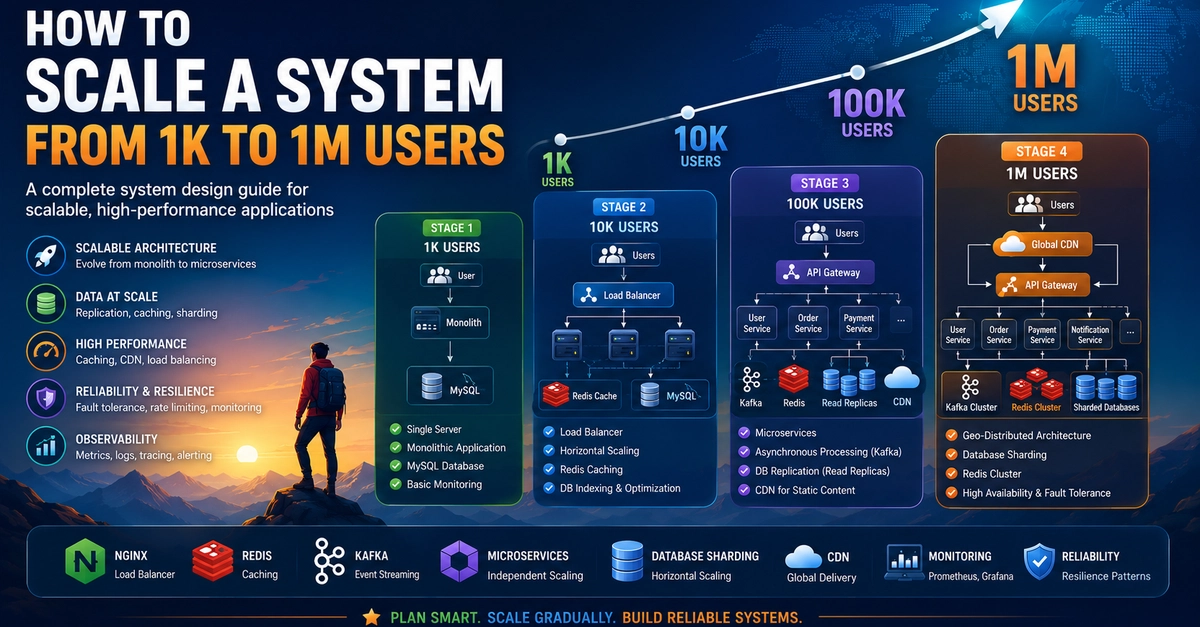
A practical scalability journey often looks like this:
1K Users
Monolith architecture
Single database
Simple deployments
Faster feature delivery
At this stage, simplicity matters more than complex architecture.
10K Users
Load balancer introduced
Redis caching added
Stateless APIs
Database optimization becomes critical
This is usually where databases become the first bottleneck.
100K Users
CDN for static assets
Async processing
Message queues
Database replication
Event-driven workflows
Now distributed system concepts start becoming important.
1 Million Users
Microservices architecture
Distributed caching
Database sharding
Reliability engineering
Advanced observability
At this scale:
failures become inevitable.
Systems must recover gracefully.
1. Premature Microservices Are a Mistake
Most startups do not need microservices early.
Monoliths provide:
Faster development
Easier debugging
Lower operational complexity
2. Databases Become Bottlenecks First
Before scaling infrastructure:
optimize queries
add indexes
use caching properly
avoid N+1 queries
3. Caching Changes Everything
Technologies like Redis can dramatically reduce database load and improve response times.
4. Reliability Matters More at Scale
As systems grow:
monitoring
retries
circuit breakers
rate limiting
observability
become critical engineering requirements.
Good system design is not about building the most complex architecture.
It is about:
solving real bottlenecks
keeping systems reliable
scaling incrementally
making the right trade-offs at the right time
The best scalable systems are usually the simplest systems that evolved carefully over time.
Complete detailed guide with architecture diagrams, scaling patterns, caching strategies, microservices, sharding, reliability engineering, and Spring Boot best practices available on ProfileDocker.Take me to complete details guide : https://www.profiledocker.com/blog/how-to-scale-a-system-from-1k-to-1-million-users-complete-system-design-guide-fo-OeuCUY
Alternatively you can also visit to medium page : https://medium.com/@shantan.golla/how-systems-actually-scale-from-1k-to-1-million-users-12999e8b9455