DAILY NEWS

Stay Ahead, Stay Informed – Every Day

Advertisement
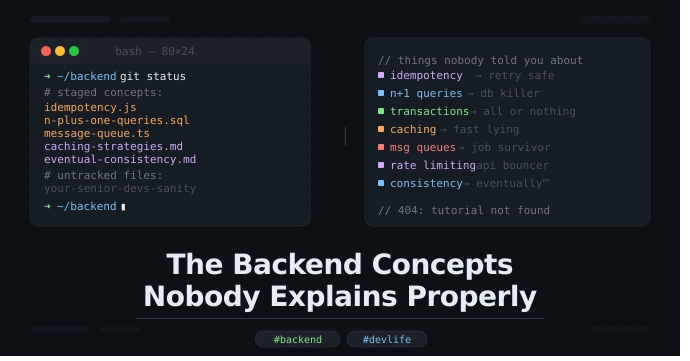
The Backend Concepts Nobody Explains Properly


And why your senior dev sighs every time you ask about them

So here’s the thing. You’ve been writing code for a while now. Maybe a year, maybe two. You can build a REST API, you know what a database is, you’ve definitely Googled “how to fix CORS error” at least 47 times. You’re getting there.

But then someone in a meeting drops a word like idempotency or eventual consistency and suddenly everyone’s nodding like they totally get it, and you’re just sitting there smiling and thinking — what the hell does that mean and why did no one explain it properly.

This blog is for that version of you. And honestly, a little bit for me too because I’ve been that person more times than I’d like to admit.

  1. Idempotency (the one everyone pretends to understand)

Okay so idempotency basically means — if you do the same operation multiple times, the result should be the same as doing it once.

That’s it. That’s the whole thing.

But where it actually matters is in APIs. Say a user clicks “Pay Now” and the request fails halfway. Their app retries. Did they just get charged twice? If your endpoint isn’t idempotent — yes. Yes they did. And now you have an angry customer and a support ticket and a bad day.

The fix is usually sending a unique key with each request (called an idempotency key) so the server can say “oh, I already processed this one, let me just return the same result.”

Stripe does this. Stripe explains it well. Most tutorials do not. Now you know.

  1. The N+1 Query Problem (your database’s silent cry for help)

This one physically hurts me because I wrote N+1 queries for like six months without knowing it.

Imagine you’re fetching a list of 100 users. Then for each user, you fetch their profile. Sounds fine in code. Looks terrible in your database logs — 1 query to get users, then 100 queries to get profiles. That’s 101 queries total. Hence “N+1.”

Your app works. It’s just slow. And at scale it’s really slow. And your DBA is quietly losing their mind.

The solution is usually eager loading — basically telling your ORM to fetch everything in one go using a JOIN. In Rails it’s includes, in Django it’s select_related, in every other framework there’s some equivalent that you need to learn exists.

Tools like Django Debug Toolbar or Laravel Debugbar will literally show you this problem in red. Use them. Please.

  1. Database Transactions (not just for banks)

Okay so a transaction is basically — either all of this happens, or none of it does.

Classic example: you’re transferring money. You debit one account and credit another. If the debit works but the credit fails… someone just lost money and it didn’t go anywhere. Cool. Great system.

Transactions wrap multiple operations so they succeed or fail together. If something breaks in the middle, it rolls back. Everything goes back to how it was.

The thing nobody explains is the ACID properties — Atomicity, Consistency, Isolation, Durability. These sound very textbook but they’re actually just answering four questions:

Did all of it happen or none of it? (Atomicity)
Is the data still valid after? (Consistency)
Can two operations mess each other up? (Isolation)
If the server crashes, do we lose data? (Durability)

You don’t need to memorize the acronym. Just know that when something important needs to happen together — wrap it in a transaction.

  1. Caching (the art of lying to your users, but fast)

Caching is when you store the result of something expensive so you don’t have to compute it again. That’s it.

The real stuff nobody explains is cache invalidation — deciding when to throw away the cached result and fetch fresh data. This is genuinely one of the hardest problems in computer science. Not joking. Phil Karlton famously said there are only two hard things in computer science: cache invalidation and naming things. He was right.

Common strategies:

TTL (Time To Live) — cache expires after X seconds. Simple. Sometimes wrong.

Cache aside — app checks cache first, if not there fetches from DB and stores it. Very common.

Write through — every write updates both cache and DB at the same time. Slower writes, fresher reads.

Where it gets interesting is distributed caches — like Redis running on a separate server. Now you’ve got to think about what happens if Redis goes down. Or if two servers update the cache at the same time. Or if the cache gets so full it starts evicting stuff you still needed.

Nobody warns you about this stuff when they say “just add Redis.”

  1. Message Queues (the answer to “what if this crashes”)

At some point you’ll have a feature where you need to send an email, or process a payment, or resize an image — and you don’t want the user to wait for all that before the page loads.

The beginner solution is to just do it async in a background thread. This works until your server restarts and all those background tasks just… disappear. Poof. Gone.

Message queues solve this. You push a job into a queue (like RabbitMQ, SQS, or Redis with Sidekiq). A worker picks it up and processes it. If it fails, it retries. If your server crashes, the job is still in the queue when it comes back.

The concept nobody explains: at-least-once delivery. Most queues guarantee a message will be delivered at least once — but not exactly once. So your worker might process the same job twice. Which means your worker needs to be… idempotent. See, it’s all connected.

  1. Rate Limiting (being a bouncer for your API)

You built an API. Someone decides to hit it 10,000 times per second. Either accidentally because their while loop has no sleep, or on purpose because they’re not a great person.

Rate limiting is saying “you get 100 requests per minute, after that I’m ignoring you for a bit.”

The part nobody explains clearly is how it’s actually implemented. There are a few algorithms:

Token bucket — you get X tokens per minute. Each request costs one token. When you’re out, you wait.

Leaky bucket — requests go into a queue, processed at a fixed rate. Smooths out spikes.

Fixed window — you get X requests per minute window. Resets every minute. Simple but gameable at the edges.

Sliding window — more accurate version of the above. Slightly more expensive to compute.

Most people just use the middleware and never look at which algorithm it uses. That’s fine. But when your rate limiting is behaving weird, this is why.

  1. Eventual Consistency (your data will be right… eventually)

This one sounds scary but the concept is simple once you stop trying to make it complicated.

In distributed systems, sometimes different parts of the system see different versions of the data for a short period. That’s eventual consistency — the system will get to the correct state eventually, just not instantly.

Think of it like this: you post a tweet. Your friend in another country sees it 3 seconds later. In between, some servers had it and some didn’t. That gap — that’s eventual consistency in action.

The reason this exists is because making all servers agree on every write immediately is really slow and really hard. So instead, you let them be briefly out of sync and just make sure they converge. The tradeoff is that during that window, different users might see different data.

For most apps this is fine. For some apps (banking, anything involving money moving) it’s not fine, and you need stronger guarantees. Knowing which one you need is the real skill.

The Bigger Point

These aren’t advanced topics. They come up in normal day-to-day engineering. But they’re poorly explained in most tutorials because tutorials focus on making things work, not on making things work at 3am when everything’s on fire.

Understanding these things doesn’t make you a 10x engineer or whatever. It just makes you the developer who actually knows why something broke instead of just restarting the server and hoping.

Which, honestly, is a great place to be.

If this helped even a little bit, share it with a junior dev who’s faking their way through architecture discussions. We’ve all been there.


Source link

Internet Architecture – DEV Community


Internet Architecture describes how data is organized, transmitted, and managed across networks. Different architectural models serve different needs, some offer a straightforward client-server setup (like a website), while others rely on a more distributed approach (like file-sharing platforms).

Peer-to-Peer (P2P) Architecture

This is when computers and devices are linked directly to each other without the need for a central server. This system can be fully decentralised or partially centralized as the server does some tasks but doesn’t host any of the data. This setup allows nodes to communicate directly with each other, sharing resources such as files, processing power, or bandwidth, without the need for a central server.

For example, three friends finished college and want to share their college photos with eachother. Instead of uploading all the photos to a single website or server, each of them sets up a folder on their own computer that can be accessed by the others. They use a file-sharing program that connects their computers directly.

First, they install a Peer-to-Peer (P2P) file-sharing application on their computer and then select the folder containing the photos to share with the other friends. Everyone preforms the same setup on their computers and once everyone is connected though the P2P application, they can all browse and download photos directly from the other’s shared folders. This allows for a direct exchange of files without the need for a central server.

A popular example of Peer-to-Peer (P2P) architecture is torrenting, as seen with applications like BitTorrent. In this system, anyone who has the file, referred to as a seeder, can upload it, allowing others to download it from multiple sources simultaneously.

Advantages

Scalability – Adding more nodes can increase total resources (storage, CPU, etc.).
Resilience – If one node goes offline, others can continue functioning.
Cost distribution – Resource burden, like bandwidth and storage, is distributed among peers, making it more cost-efficient.

Disadvantages

Management complexity – Harder to control and manage updates/security policies across all nodes
Potential reliability issues – If too many peers leave, resources could be unavailable.
Security challenges – Each node is exposed to potential vulnerabilities.

Client-Server Architecture

This model is one of the most widely used architectures on the Internet. Clients(user devices) send requests, such as a web browser asking for a webpage, and the severs then respond to these requests, like a web server hosting that webpage. This model typically involves centralized servers where data and applications reside, with multiple clients connecting to these servers to access services and resources.

Say, you want to check the weather forecast on a website. You start by opening the web browser on you phone or computer, and proceed to type in the website’s name, e.g., weather.com. When we press enter, the browser sends a request over the Internet to the server that hosts weather.com. This server, a powerful computer set up specifically to store the website’s data and handle requests, receives the query and processes it by locating the requested page. It then sends back the data (regarding the request) to our browser, which receives this information and displays the webpage, allowing us to see the latest weather updates.

Single-Tier Architecture

In a single-tier architecture, the client, server, and database all reside on the same machine. This setup is straightforward but is rarely used for large-scale applications due to significant limitations in scalability and security.

Two-Tier Architecture

The two-tier architecture splits the application environment into a client and a server. The client handles the presentation layer, and the server manages the data layer. This model is typically seen in desktop applications where the user interface is on the user’s machine, and the database is on a server. Communication usually occurs directly between the client and the server, which can be a database server with query-processing capabilities.

Three-Tier Architecture

A three-tier architecture introduces an additional layer between the client and the database server, known as the application server. In this model, the client manages the presentation layer, the application server handles all the business logic and processing, and the third tier is a database server. This separation provides added flexibility and scalability because each layer can be developed and maintained independently.

N-Tier Architecture

In more complex systems, an N-tier architecture is used, where N refers to any number of separate tiers used beyond three. This setup involves multiple levels of application servers, each responsible for different aspects of business logic, processing, or data management. N-tier architectures are highly scalable and allow for distributed deployment, making them ideal for web applications and services that demand robust, flexible solutions.

Advantages

Centralized control – Easier to manage and update.
Security – Central security policies can be applied.
Performance -Dedicated servers can be optimized for their tasks.

Disadvantages

Single point of failure – If the central server goes down, clients lose access.
High Cost and Maintenance – Setting up and sustaining a client-server architecture is expensive, requiring constant operation and expert management , making it costly to maintain.
Network Congestion – High traffic on the network can lead to congestion, slowing down or even disrupting connections when too many clients access the server simultaneously.

Hybrid Architecture

A Hybrid model blends elements of both Client-Server and Peer-to-Peer (P2P) architectures. In this setup, central servers are used to facilitate coordination and authentication tasks, while the actual data transfer occurs directly between peers. This combination leverages the strengths of both architectures to enhance efficiency and performance.

For example, when you open a video confrencing app(eg. Zoom) and log in, the username and password are verified by central servers, which also manage the session by co-ordinating who is in the meeting and controlling access. Once you are logged in and the meeting begins, the video and audio data is transferred directly between your device and other’s, bypassing the central server. This reduces lag and enchances the video quality. By using the central server for initial connection and control tasks, while the bulk of data transfer occurs in a peer-to-peer style, you can reduce the server load and leverage direct, fast connections between peers.

Advantage

Efficiency – Relieves workload from servers by letting peers share data.
Control – Central server can still manage user authentication, directory services, or indexing.

Disadvantage

Complex Implementation – Requires more sophisticated design to handle both centralized and distributed components.
Potential Single Point of Failure – If the central coordinating server fails, peer discovery might stop.

Cloud Architecture

Cloud Architecture refers to computing infrastructure that is hosted and managed by third-party providers, such as AWS, Azure, and Google Cloud. This architecture operates on a virtualized scale following a client-server model. It provides on-demand access to resources such as servers, storage, and applications, all accessible over the Internet. In this model, users interact with these services without controlling the underlying hardware.

Services like Google Drive or Dropbox are some examples of Cloud Architecture operating under the SaaS (Software as a Service) model, where we access applications over the internet without managing the underlying hardware. Below are five essential characteristics that define a Cloud Architecture.

Characteristic

On-demand self-service – Automatically set up and manage the services without human help.
Broad network access – Access services from any internet-connected device.
Resource pooling – Share and allocate service resources dynamically among multiple users.
Rapid elasticity – Quickly scale services up or down based on demand.
Measured service – Only pay for the resources you use, tracked with precision.

Advantages

Scalability – Easily add or remove computing resources as needed.
-Reduced cost & maintenance – Hardware managed by the cloud provider.
-Flexibility – Access services from anywhere with Internet connectivity.

Disadvantages

Vendor lock-in – Migrating from one cloud provider to another can be complex.
Security/Compliance – Relying on a third party for data hosting can introduce concerns about data privacy.
Connectivity – Requires stable Internet access.

Software-Defined Architecture (SDN)

Software-Defined Networking (SDN) is a modern networking approach that separates the control plane, which makes decisions about where traffic is sent, from the data plane, which actually forwards the traffic. Traditionally, network devices like routers and switches housed both of these planes. However, in SDN, the control plane is centralized within a software-based controller. This configuration allows network devices to simply execute instructions they receive from the controller. SDN provides a programmable network management environment, enabling administrators to dynamically adjust network policies and routing as required. This separation makes the network more flexible and improves how it’s managed.

Advantages

Centralized control – Simplifies network management.
Programmability & Automation – Network configurations can be changed quickly through software instead of manually configuring each device.
Scalability & Efficiency – Can optimize traffic flows dynamically, leading to better resource utilization.

Disadvantages

Controller Vulnerability – If the central controller goes down, the network might be adversely affected.
Complex Implementation – Requires new skill sets and specialized software/hardware.


Source link

There is a moment, after I finish a prompt and before I press send, when the …


There is a moment, after I finish a prompt and before I press send, when the room becomes very quiet. The machine is waiting. It has nothing to do until I say so. And in that pause something happens that doesn’t get talked about much: I get to choose whether the question was worth asking.

Most days I let the moment pass. I send. The model answers. I move on. But sometimes I sit with the unsent prompt and notice it isn’t actually a question — it is a small panic dressed as curiosity. A reflex. An evasion of doing the thing myself.

The discipline I keep failing at isn’t writing better prompts. It is writing fewer of them. Knowing when not to ask. Letting the silence between requests be a place where I think instead of a place where I outsource thinking.

The model is endlessly patient. That is its gift and its trap. It will answer anything, no matter how thin the question. Which means the burden of seriousness falls entirely on me. There is no friction left to protect me from my own laziness except the friction I install myself.

Lately I keep a small ritual: before I send anything, I read the prompt back to myself out loud. If it sounds like something I should already know, or something I would rather not figure out, I close the window. The unsent prompt is the most honest thing I write some days.

Tools don’t teach you discipline. They reveal where you never had any.


Source link