DAILY NEWS

Stay Ahead, Stay Informed – Every Day

Advertisement
I built a startup waitlist landing page in Next.js 15 — here are all the decisions I made


I’ve been building Next.js templates as a side project and selling them on Gumroad. This weekend I shipped the fourth one: Orbit, a startup launch and waitlist landing page.

Here’s a breakdown of every technical decision I made.

Why Next.js 15 with CSS Modules (no Tailwind)

Most templates use Tailwind. That’s fine for customization, but it adds a compilation step and a learning curve for buyers who just want clean CSS they can read and edit.

CSS Modules give you:

Locally scoped class names (no conflicts)
Standard CSS syntax (no utility memorization)
Zero runtime cost
Works with Next.js out of the box

The tradeoff is more verbose than Tailwind for repetitive utilities. Worth it for a product you’re selling.

The bento grid — 1px gap trick

The features section uses CSS Grid with grid-template-columns: repeat(3, 1fr). The first card spans 2 columns via grid-column: span 2.

.bento {
display: grid;
grid-template-columns: repeat(3, 1fr);
gap: 1px;
background: var(–color-border-subtle); /* gap IS the border */
border-radius: var(–radius-lg);
overflow: hidden;
}

.bento .card:first-child {
grid-column: span 2;
}

Enter fullscreen mode

Exit fullscreen mode

Instead of adding borders to each card, I set the grid’s background to the border color and use 1px gaps. The cards themselves have no borders. This gives perfectly consistent grid lines with zero extra markup.

Count-up animation with IntersectionObserver

The metrics section triggers a count-up when the section enters the viewport:

const observer = new IntersectionObserver(((entry)) => {
if (entry.isIntersecting && !started.current) {
started.current = true
const startTime = performance.now()

const tick = (now: number) => {
const progress = Math.min((now – startTime) / duration, 1)
const eased = 1 – Math.pow(1 – progress, 3) // cubic ease-out
setCount(Math.round(eased * end))
if (progress 1) requestAnimationFrame(tick)
}

requestAnimationFrame(tick)
}
}, { threshold: 0.4 })

Enter fullscreen mode

Exit fullscreen mode

The started ref prevents re-triggering if the user scrolls away and back. Cubic ease-out feels much more natural than linear. No library — 30 lines of TypeScript.

Infinite logo marquee (CSS-only)

.row {
display: flex;
gap: 64px;
width: max-content;
animation: marquee 24s linear infinite;
}

@keyframes marquee {
from { transform: translateX(0); }
to { transform: translateX(-50%); }
}

Enter fullscreen mode

Exit fullscreen mode

The key: duplicate the logos array in the component and animate exactly -50% (half the total width). Seamless loop. Edge fade via mask-image on the parent:

.track {
mask-image: linear-gradient(
to right,
transparent 0%, black 12%, black 88%, transparent 100%
);
}

Enter fullscreen mode

Exit fullscreen mode

Single content file

All editable content — name, copy, nav links, logos, features, metrics, testimonials, FAQ — lives in src/lib/constants.ts. The buyer touches one file and the whole page updates. No hunting through components.

Design tokens in globals.css

8 variables to rebrand the entire template:

:root {
–color-accent: #f59e0b; /* change this → full rebrand */
–color-bg: #09090b;
–font-display: ‘Sora’, sans-serif;
–font-body: ‘IBM Plex Sans’, sans-serif;
–radius-lg: 16px;
}

Enter fullscreen mode

Exit fullscreen mode

Connecting the waitlist form

The form ships with a simulated delay. Replace it with your stack:

/* ConvertKit */
await fetch(`https://api.convertkit.com/v3/forms/${FORM_ID}/subscribe`, {
method: ‘POST’,
headers: { ‘Content-Type’: ‘application/json’ },
body: JSON.stringify({ api_key: KEY, email }),
})

/* Loops */
await fetch(‘https://app.loops.so/api/v1/contacts/create’, {
method: ‘POST’,
headers: { Authorization: `Bearer ${KEY}`, ‘Content-Type’: ‘application/json’ },
body: JSON.stringify({ email }),
})

Enter fullscreen mode

Exit fullscreen mode

Live demo: https://orbit-landing-iota.vercel.app/

The template is available on Gumroad for $29: https://devmaya.gumroad.com/l/orbit


Source link

Why PostgreSQL and ClickHouse Work So Well Together


A lot of people compare PostgreSQL and ClickHouse like they are competing databases.

They really are not.

In fact, modern data systems often use both together.

And once you understand what each database is optimized for, the reason becomes pretty obvious.

The biggest mistake people make is expecting both databases to behave similarly.

They are built for entirely different workloads.

PostgreSQL is primarily an OLTP database.

ClickHouse is primarily an OLAP database.

That single difference changes almost everything about how they think internally.

PostgreSQL is extremely good at handling transactional workloads.

Things like:

user data
payments
inventory
banking records
order systems
application state

These are systems where:

consistency matters
updates happen frequently
rows are modified constantly
transactions must be reliable

For example:

UPDATE inventory
SET stock = stock – 1
WHERE product_id = 101;

Enter fullscreen mode

Exit fullscreen mode

This kind of workload is where PostgreSQL shines.

You want:

ACID guarantees
reliable transactions
row-level updates
strong consistency

PostgreSQL is designed around exactly that.

ClickHouse approaches data very differently.

Instead of optimizing for frequent row updates, it optimizes for analytical queries across massive datasets.

Things like:

metrics
observability
logs
event streams
analytical dashboards
time-series workloads

For example:

SELECT
service_name,
avg(response_time_ms)
FROM metrics
WHERE timestamp >= now() – INTERVAL 1 HOUR
GROUP BY service_name;

Enter fullscreen mode

Exit fullscreen mode

This is a completely different style of workload.

Instead of:

modifying small numbers of rows

ClickHouse is optimized for:

scanning huge amounts of data efficiently
aggregating billions of records
compressing analytical datasets
fast columnar reads

This is honestly the simplest way I think about it now.

PostgreSQL usually stores:

current application state
transactional business data
operational records

ClickHouse usually stores:

analytical history
events
metrics
large-scale queryable telemetry

One powers the application.

The other explains what the application is doing.

This is where things get interesting.

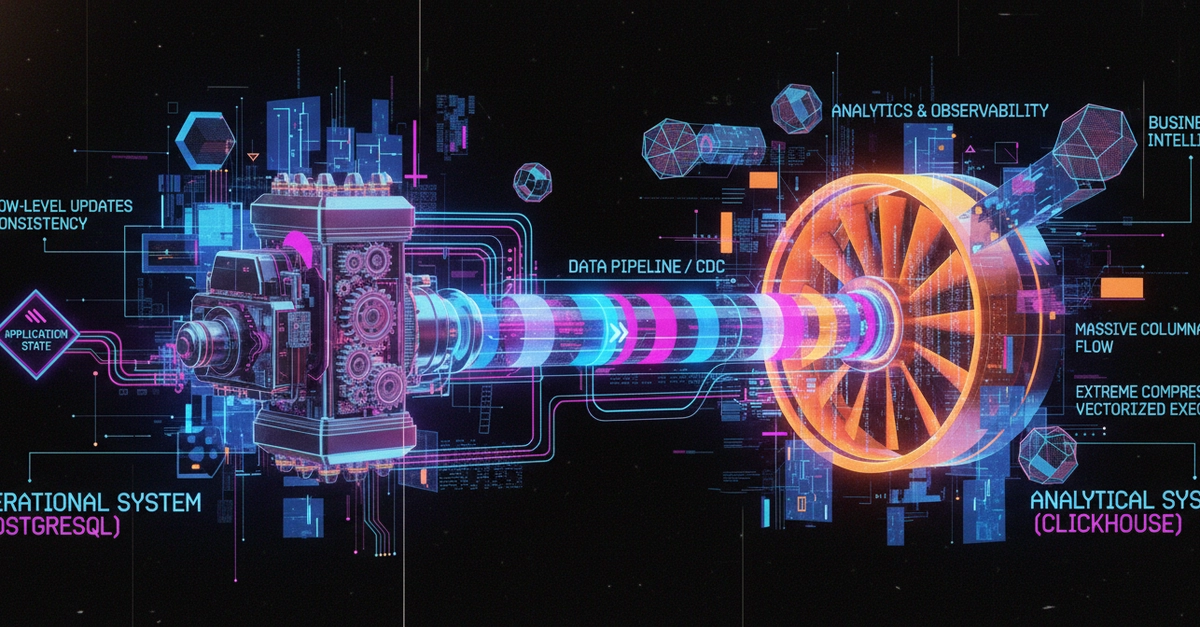
In many modern architectures, PostgreSQL becomes the operational source of truth.

Then data flows into ClickHouse for analytics.

Something like this:

Application

PostgreSQL

CDC / Airbyte / Kafka

ClickHouse

Dashboards / Analytics / Observability

Enter fullscreen mode

Exit fullscreen mode

This pattern is far more common than many people realize.

Because each database is doing what it is best at.

PostgreSQL can do analytical queries.

But analytical workloads behave very differently from transactional workloads.

For example:

scanning billions of rows
large aggregations
observability queries
real-time analytics
historical trend analysis

These workloads stress databases differently.

ClickHouse is optimized around:

columnar storage
vectorized execution
aggressive compression
analytical query execution

That is why queries over huge datasets often feel dramatically faster in ClickHouse.

This is another common misunderstanding.

ClickHouse is incredible for analytics.

But transactional systems require things like:

frequent updates
transactional consistency
row-level modifications
operational application state

That is not the primary design goal of ClickHouse.

You generally do not want your:

user authentication system
banking transactions
inventory updates
operational business logic

to depend entirely on analytical database behavior.

What I personally find interesting is how these systems complement each other instead of replacing each other.

PostgreSQL handles:

ClickHouse handles:

That separation creates much cleaner architectures.

Instead of forcing one database to solve every problem, each system handles the workload it was designed for.

One thing that makes this architecture powerful is CDC (Change Data Capture).

Instead of manually exporting data repeatedly, systems can stream changes from PostgreSQL into ClickHouse continuously.

Tools like:

Debezium
Airbyte
Kafka pipelines

make this pattern extremely practical now.

The operational system continues running normally while analytical systems receive data almost in real time.

The differences go deeper than just “transactions vs analytics”.

PostgreSQL thinks heavily about:

rows
transactional consistency
updates
locking
relational integrity

ClickHouse thinks heavily about:

columns
compression
merges
partitions
analytical scans
aggregation efficiency

Even their storage engines reflect completely different priorities.

Once you stop viewing databases as competitors and instead view them as workload-specific systems, the architecture starts making much more sense.

PostgreSQL handles the operational side.

ClickHouse handles the analytical side.

Together, they create systems that can:

process transactions reliably
scale analytical workloads efficiently
support observability
power dashboards
retain huge historical datasets

without forcing a single database to do everything.

The more I learn about databases, the more I realize that most modern architectures are really about separation of responsibilities.

PostgreSQL and ClickHouse work well together because they optimize for fundamentally different problems.

One is built to preserve business state reliably.

The other is built to analyze massive amounts of history efficiently.

And when combined properly, they complement each other extremely well.


Source link

System Design Tradeoffs – DEV Community


System Design Tradeoffs

Scaling

Vertical vs Horizontal Scaling
Scalability vs Performance

Consistency & Availability

Consistency vs Availability (CAP)
Strong vs Eventual Consistency
ACID vs BASE

Data & Storage

SQL vs NoSQL
Normalization vs Denormalization
Read-Through vs Write-Through Cache

Communication & Processing

Synchronous vs Asynchronous Communication
Batch vs Stream Processing
Long Polling vs WebSockets vs SSE
Push vs Pull Architecture
REST vs GraphQL vs gRPC
REST vs RPC

Architecture

Monolith vs Microservices
Stateful vs Stateless Design
Concurrency vs Parallelism

Performance

Latency vs Throughput
Performance vs Cost

🔗 Connect with me on LinkedIn:Let’s dive deeper into the world of software engineering together! I regularly share insights on JavaScript, TypeScript, Node.js, React, Next.js, data structures, algorithms, web development, and much more. Whether you’re looking to enhance your skills or collaborate on exciting topics, I’d love to connect and grow with you.

Follow me: Nozibul Islam


Source link